An extension for Adobe Premiere Pro

Leave CapCut.
Stay in Premiere.

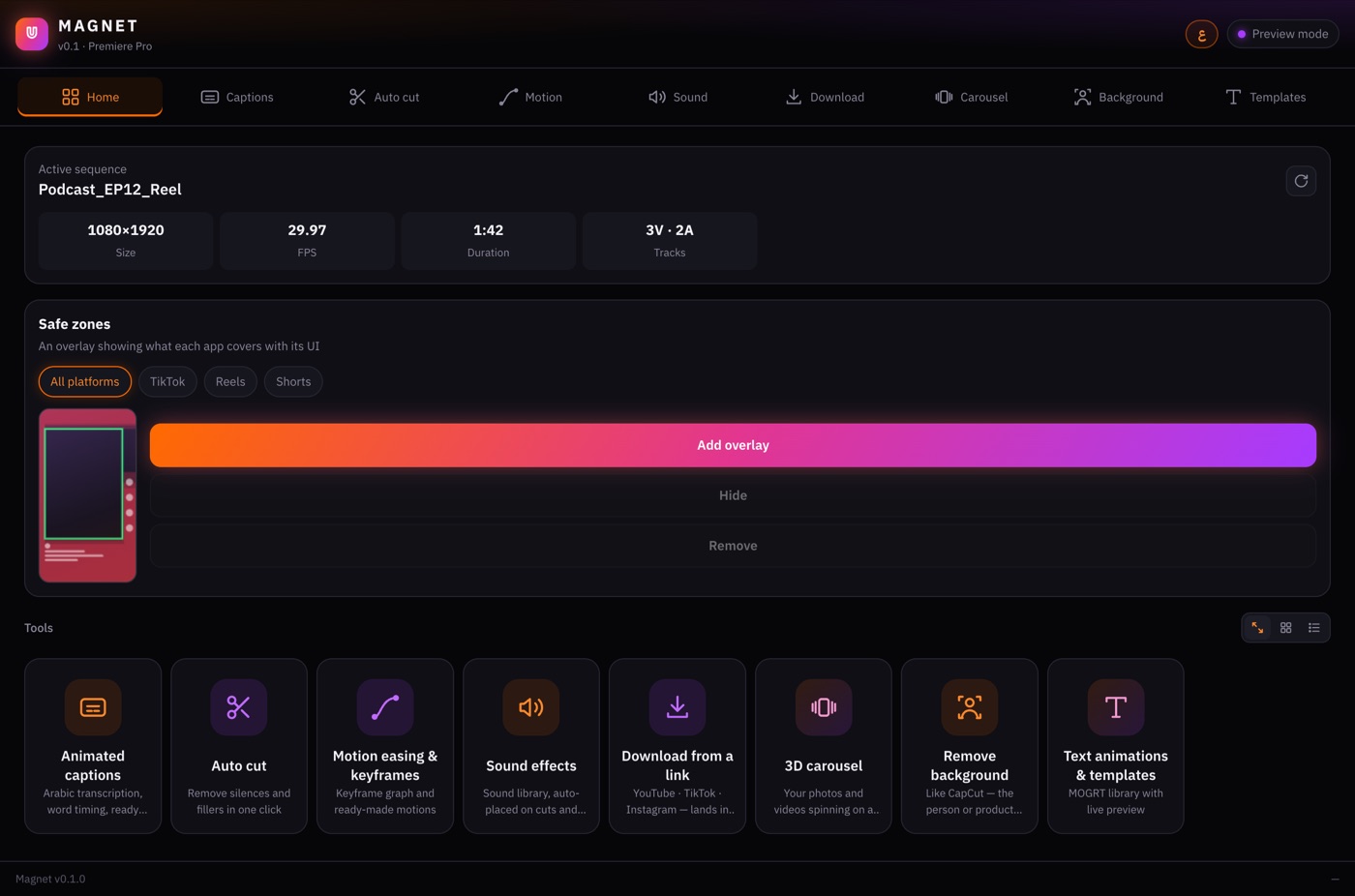
The tools you used to export to CapCut for, in one panel inside Premiere: animated captions, silence cutting, sound effects, 3D carousels, background removal and templates. One click each, on the same timeline.

All tools + 300 AI sound credits every month · Cancel anytime

  • Mac · macOS 14+
  • Premiere Pro 2026
  • Transcribes offline, on your Mac

The tools

Everything you did in CapCut is now a tab in the panel.

Try each one right here. The demos that follow run on the extension's own code.

Captions

Captions that write themselves and move word by word

Arabic and English transcription on your Mac, timed to every word. Review the text, pick a style and apply it to every line at once, like CapCut's Apply to all. Tap any word to highlight it.

  • Offline: Whisper runs on your Mac
  • SRT export
  • Lots of styles and motions, with more on the way

Motion

Style

Tap a motion or a style.

Auto cut

Silence out. Clip tightened.

Finds the pauses and filler words, cuts them on the exact frame and closes the gaps. One click.

Length 0:48
Speech Silence & filler

Sound

A whoosh on every cut, a pop on every line

A sound library by category: tap to hear, + to drop it at the playhead. Or let Magnet place them for you: each hit lands exactly on the cut, and the same sound never plays twice in a row.

Listen

AI sound generation

Powered by ElevenLabs

Motion

After Effects easing, inside Premiere

Drag two handles or pick a ready curve, and it applies to any keyframes on any property or effect. Plus ready-made motions: entrances, exits, and moves within a clip like punch-in, pulse, shake and Ken Burns.

  • Speed graph and live preview
  • Applies the moment you let go
  • Save your own curves

Drag the handles on the graph, or pick a curve.

Background

Remove the background from the whole video

People, or anything: a product, a pet. Preview it first, then adjust the edges or invert it (keep the background, lose the subject) live. Green screen? Ultra Key in one click.

  • On Mac it uses the AI built into macOS. Nothing to download.

Safe zone

See what the app will cover

A frame over your timeline shows where TikTok, Reels and Shorts put their buttons, captions and top bar. One platform or all of them. Hide it in one click so it never ends up in the export.

Templates

Glass with real blur, not a fake

The Glass Pro capsule blurs the actual video behind it, and you adjust everything from the panel: size, position, colours, roundness. Add as many as you like. Plus liquid-glass and text-motion packs, with more coming.

Download

Import from a link

For content you have the right to use: paste the link, pick a quality or just a section, and it lands in a Premiere bin.

The panel

Arabic or English, and it fits however you dock it

Keep it narrow next to the timeline, or widen it and the tools become a grid. Everything is one click away.

The Magnet panel in Premiere, tools as a grid

The difference

Captions for one reel, two ways.

Without Magnet

  1. Export the video from Premiere
  2. Open CapCut and import it
  3. Make the captions, style them
  4. Export again
  5. Back to Premiere, import
  6. Line it up. Change the edit? Do it all again.

With Magnet

  1. Open the Captions tab
  2. Click

On the timeline, still editable

Promo video coming soon

Getting started

From subscribing to your timeline.

  1. SubscribeMonthly or yearly.
  2. Download MagnetThe link comes by email.
  3. Install itThen open Premiere Pro.
  4. Open Magnet and sign inWindow › Extensions › Magnet — with the email you subscribed with.

What you need

Computer
Mac with macOS 14 or newer
Premiere Pro
2026
Download
About 45–70 MB
Transcription model
547 MB, once, on first use
Windows
Not available yet

One account, one device at a time.

Sign in with your email inside Magnet. Open your account on another computer and the first one signs out by itself.

See the plans

Pricing

Every tool. One subscription.

Monthly

55AED / month

About $15

  • Every Magnet tool and update
  • 300 AI sound credits every month
  • The full sound effects library
  • Cancel anytime
Subscribe monthly
Best value · 2 months free

Yearly

549AED / year

AED 45.75 a month · about $150

  • Everything in Monthly
  • 300 credits every month (3,600 a year)
  • Your price is locked for the year
Subscribe yearly

Extra credits

For subscribers. 1 credit = 1 second of sound generated from a description.

Pay with Visa, Mastercard, Apple Pay, Google Pay or PayPal, in your local currency. Taxes are calculated at checkout.

Questions

Asked a lot.

Does transcription need the internet?

No. Whisper runs on your Mac. The only download is the transcription model (about 547 MB), once, the first time you use it.

Do captions support Arabic?

Arabic comes first: transcription, word timing, styles and motions are all built for it, and English works too.

Does it work on Windows?

Not yet. It's Mac only for now. A Windows version comes later.

Which Premiere version?

Premiere Pro 2026. The newest caption and glass templates are built for it.

Does background removal need a download?

Not on Mac. It uses the AI built into macOS.

How much is it?

AED 55 a month, or AED 549 a year (2 months free). Both include every tool and 300 sound credits a month.

What are credits?

Credits are used to generate new sound effects from a description. 1 credit = 1 second of sound. Every other tool and the sound library use no credits.

Can I use it on two computers?

Your account works on one computer at a time. Sign in on another one to move it there — the old one signs out by itself.
Terms, in short

Import from a link is for content you have the right to use. You're responsible for respecting creators' rights and each platform's terms. Full terms will be published with the first version.

Ready to leave CapCut?

Every tool in one panel inside Premiere, for AED 55 a month.